Microsoft Fabric pricing explained: what you'll actually pay

How much does Microsoft Fabric actually cost? The short answer takes two numbers, not one, because Fabric is priced on a capacity model with two payment options. The smallest capacity (F2) is around €164 per month if you commit to a one-year reservation, or €276 per month pay-as-you-go. For most Belgian SMEs, the sweet spot is between F2 and F8, which is roughly €164 to €657 per month reserved.
On paper, that's clean and predictable, which is one of the real strengths of the Fabric pricing model. In practice, four things about how F-SKU tiers actually work catch people off guard once they start using them. This article walks through those surprises, so you can plan a Fabric adoption with numbers that survive contact with reality.
How much does Microsoft Fabric actually cost? The short answer takes two numbers, not one, because Fabric is priced on a capacity model with two payment options. The smallest capacity (F2) is around €164 per month if you commit to a one-year reservation, or €276 per month pay-as-you-go. For most Belgian SMEs, the sweet spot is between F2 and F8, which is roughly €164 to €657 per month reserved.
On paper, that's clean and predictable, which is one of the real strengths of the Fabric pricing model. In practice, four things about how F-SKU tiers actually work catch people off guard once they start using them. This article walks through those surprises, so you can plan a Fabric adoption with numbers that survive contact with reality.
How the F-SKU model actually works
Microsoft Fabric bills compute in capacity units (CUs). You buy a capacity sized as an F-SKU (from F2 at the bottom, doubling all the way up to F2048 at the top), and every service inside Fabric (Data Factory pipelines, Lakehouse queries, Power BI, Notebooks, Copilot) draws from the same shared pool. There is no per-service price list to reconcile at the end of the month. That is the part of the model that helps.
⚠️ Storage sits outside the CU pool: OneLake is billed separately, at approximately €0.02 per GB per month for hot data, with cool and cold tiers costing less. On a first data platform, storage is usually a rounding error next to compute.
There are two ways to pay:
Pay-as-you-go (PAYG): billed by the hour at €0.1892 per CU per hour (about €138 per CU per month if the capacity never sleeps). PAYG capacity can be paused, which makes it the right choice for development environments and anything that runs on a schedule.
One-year reservation: €985.68 per CU per year, or about €82 per CU per month. That is roughly 40% cheaper than PAYG, but it bills whether the capacity is running or not. Also, the three-year term is priced at exactly three times the one-year rate, so there is nothing to gain by committing longer.
In short, you're paying for the parking spot, not the mileage. This is a very different logic from Databricks (pay per DBU consumed) or Snowflake (pay per compute-second).
Finance teams like that predictability. But this model actually comes with its fair share of surprises.
#1 Capacity doubles at every tier
Every step up in F-SKU tier doubles the previous cost. F2 to F4 to F8 to F16 to F32 to F64. It sounds obvious when you say it out loud, but the consequences are not always anticipated.
Here are the actual monthly rates for the tiers most SMEs consider (Azure retail rates for West Europe, checked in July 2026):
Capacity | CUs | Pay-as-you-go, always-on | One-year reservation |
|---|---|---|---|
F2 | 2 | €276/month | €164/month |
F4 | 4 | €552/month | €328/month |
F8 | 8 | €1,105/month | €657/month |
F16 | 16 | €2,210/month | €1,314/month |
F32 | 32 | €4,420/month | €2,628/month |
F64 | 64 | €8,840/month | €5,257/month |
If you're on F4 reserved (~€328 per month) and your workload starts saturating capacity, the move to F8 is a 100 percent bump… And it’s the same at every step above. The pricing curve has no gentle transitions; it's a staircase where every step is exactly the height of everything you're currently paying!
The temptation is to size up defensively, buying F8 when F4 would probably do. Resist it! Scaling up in Fabric takes a few clicks, while buying a tier bigger than you need commits you to a year of invoices at the wrong level.
Our suggestion: start close to your expected baseline, and use Microsoft's free Fabric Capacity Metrics app to decide when to scale up on evidence. It's a dedicated app you install inside your Fabric workspace, showing:
CU utilisation by the hour
The top-consuming artifacts
Any throttling events
Give one named person the job of reviewing it monthly. The organisations that skip that step are the ones who end up on F16 when F8 would have done.
#2 The F64 Power BI licensing catch
This is the calculation most Fabric budgets get wrong, because licensing and infrastructure usually sit in different columns of the same spreadsheet.
Here’s a practical example.
Below F64, every person who opens a Power BI report needs a Power BI Pro license (around €13 per user per month) on top of the Fabric capacity. At F64 and above, report viewers need no license of their own as long as they have the viewer role on the workspace. However, people who build and publish reports still need Pro either way.
Moral of the story: run the comparison before you assume the smaller SKU is cheaper! The gap between an F32 reservation and an F64 reservation is about €2,630 per month. At €13 per Pro license, that gap closes at around 200 report viewers. Above that number, the bigger capacity is the cheaper option, and it comes with twice the compute.
If your reporting audience is small (under 100 viewers), stay well below F64 and pay per Pro license.
If it's large (a few hundred employees who consume dashboards without editing them), F64 flips the arithmetic in your favor.
#3 You pay for capacity even when idle
Reserved capacity means what it says. You pay the same at 3am on Sunday as at 10am on Tuesday. If your organisation runs its reporting during business hours only and nothing at night, you're paying for parking spots you aren't using.
For most SMEs, this is fine, because their data workloads are reasonably steady during the workweek and lighter on weekends (but not zero). The premium for idle capacity is small and predictable.
But there is one profile where this becomes real waste: very spiky workloads. If your Fabric use is concentrated in a few heavy days per month (monthly close, quarterly reporting) and near-idle the rest of the time, per-consumption billing (Databricks, Snowflake) can be materially cheaper. That's a profile signal, not a tuning problem: it means Fabric may not be the right platform for you at all.
💡 Pro tip. When possible, keep dev and test capacity on PAYG and pause it outside business hours. Fabric supports pausing PAYG capacity natively (reserved capacity bills either way, which is why reservations only make sense for steady production). Set the pause up properly and you recover 30 to 50 percent of non-production cost. It's one of the simplest ways of improving your Microsoft Fabric ROI.
Production capacity typically stays running to keep dashboards responsive. That's a fixed cost you accept as part of the model.
#4 Predictable does not mean cheap
This is the most important consideration, because it's the one Microsoft's own marketing tends to underplay.
Fabric's fixed-capacity pricing is genuinely one of its strengths. Finance teams love it because there are no surprises on the invoice. But predictability comes at a price. Fabric is usually a bit more expensive than a Databricks pay-per-use setup or a well-tuned open-source stack running on Azure infrastructure. You're paying for the unified-service convenience, not for raw compute efficiency.
That premium is well spent for the right organisation.
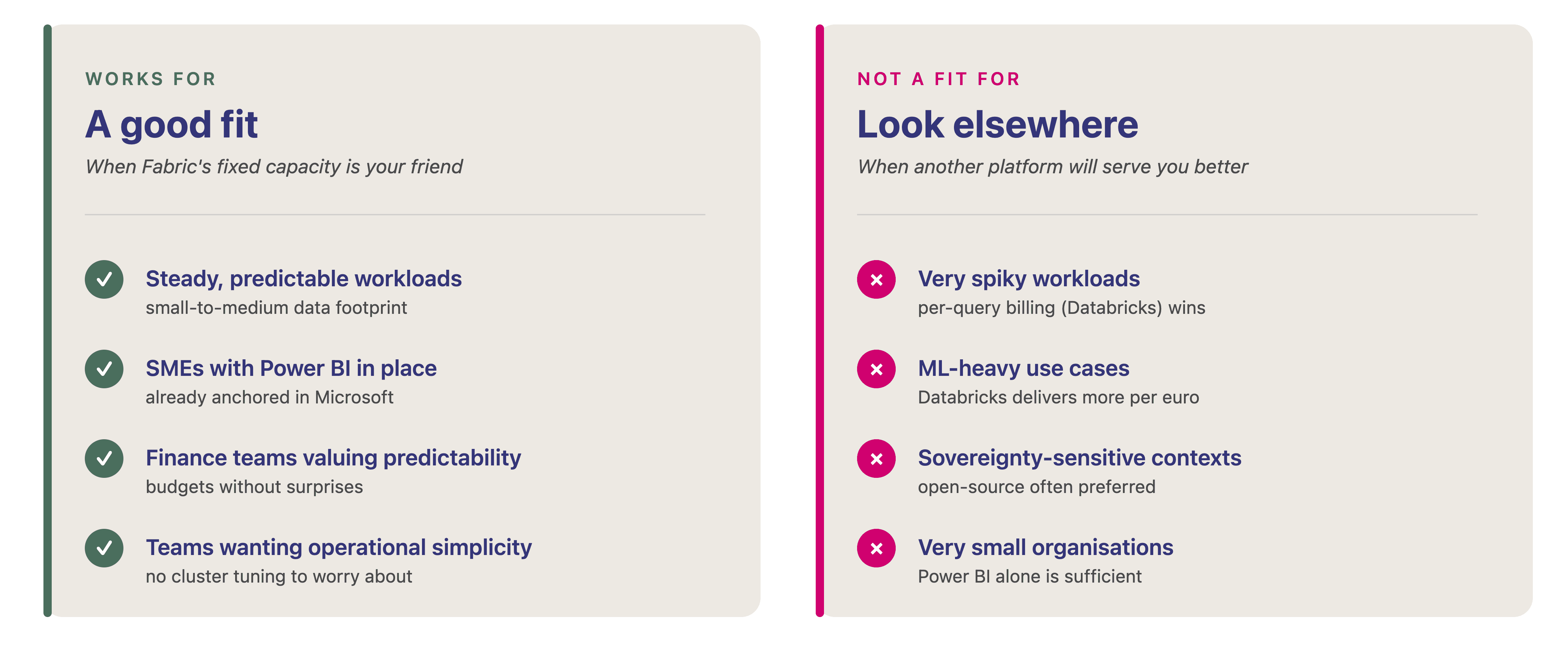
Fabric's pricing model is fair if:
Your CFO's job is to remove surprises from the budget
Your data team is small and doesn't have capacity to tune clusters
Operational simplicity is worth money to you
Other platforms will beat Fabric on total cost if:
Your CFO's job is to squeeze every euro of data infrastructure cost
Your team enjoys hand-tuning Spark clusters
Your workloads are unusual in shape (very spiky, ML-heavy, or streaming-first)
We say this out loud because nobody buying Fabric should discover, six months in, that they're paying more for the same workload than they would have with alternatives. That discovery is what turns a good data platform decision into a bad one.
The SME sweet spot for Fabric pricing
For the Belgian SMEs we work with, the capacity pattern tends to look like this:
F2 reserved (~€164/month): light reporting, basic transformations, Power BI as the main consumer. Fits small teams with a single-source-of-truth reporting need.
→ Roughly a third of our SME engagements start here and stay here.F4 reserved (~€328/month): the sweet spot. Handles Power BI, moderate data volumes, several dashboards, some transformations.
→ Where most SMEs land after 6 to 12 months.F8 reserved (~€657/month): heavier processing, larger user base, more advanced use cases (some ML, wider Copilot usage).
→ Fewer SMEs need this, but it's not unusual for growing ones.
Annual Fabric capacity spend at these tiers ranges from about €2,000 to €8,000 reserved, or €3,300 to €13,300 if you stay on PAYG. For a mid-market SME, even the higher figure is often less than what a comparable Databricks workload would cost for a single month at peak use.
The trade-off:
Fabric does not scale down for very small organisations (F2 is the floor).
It stops being cost-efficient for very large ones, since F64 and above are expensive relative to alternatives (even accounting for the Power BI Pro licence savings).
The full cost picture
Capacity is only part of the total cost. When we scope a Fabric project at Agilytic, we plan for four lines:
Implementation: €60,000 to €100,000 for an SME with clear use cases (approximately 1 to 1.5 FTE of consulting effort over 8 to 20 weeks).
Fabric capacity: €164 to €657 per month reserved for most SMEs, so €2,000 to €8,000 per year.
OneLake storage: usually a rounding error at ~€0.02 per GB per month for hot data. For a typical SME with tens of terabytes, this is a few hundred euros a year.
Year 1 maintenance and evolution: 15 to 20 percent of implementation cost, so €9,000 to €20,000. This covers the inevitable adjustments, monitoring setup, and the second wave of use cases.
Total first-year investment: roughly €70,000 to €130,000 for the full lifecycle.
In steady state after year one, expect €12,000 to €22,000 per year for capacity, storage and ongoing evolution. Exact figures depend on scope and complexity, but that range covers most of our engagements.
Tip: five habits that quietly grow your Fabric bill
⚠️ None of these are specific to Fabric. They are the same discipline problems we see in cloud cost optimisation engagements, just with a new billing unit attached.
Development capacities nobody pauses: a PAYG capacity left running nights and weekends costs roughly three times what the same capacity costs during office hours.
SKUs sized to feel safe, not sized to the workload: scaling up takes a few clicks, so there is no prize for guessing high on day one.
Spark jobs on schedules nobody has reviewed since go-live: hourly refreshes of a dataset that only changes overnight burn CUs for nothing.
Reservations left on the table: once a production capacity has run steadily for a quarter, paying PAYG list price for it is a choice.
No named owner: the Capacity Metrics app is free, but in most organisations nobody has the job of opening it monthly.
Talk to us about your Fabric cost model
If you're trying to model what Fabric would actually cost your organisation, the fastest path is a 30-minute conversation. We'll walk through your workload profile and tell you honestly which F-SKU tier you should target, whether reservation or PAYG makes sense for you, and what to expect for implementation and running costs. No slides, no obligation.
Questions Belgian leaders ask us about Fabric pricing
What is the cheapest Microsoft Fabric tier?
F2, at approximately €164 per month with a one-year reservation, or €276 per month pay-as-you-go. It's the smallest reserved capacity available and covers the majority of small-SME engagements for the first 6 to 12 months.
Can you pause Microsoft Fabric capacity?
Only PAYG capacity can be paused (and a paused capacity costs nothing except storage). Reserved capacity bills either way, which is why reservations only make sense for steady production workloads and not for development. Pausing dev and test outside business hours can save 30 to 50 percent on non-production Fabric costs.
How does Fabric F-SKU pricing compare to Databricks pricing?
Different logic. Fabric F-SKU is reserved capacity, a fixed monthly bill regardless of usage. Databricks is per-DBU consumption, you pay for the actual compute used. For steady workloads, Fabric usually wins on simplicity. For very variable or ML-heavy workloads, Databricks usually wins on total cost.
What happens if we exceed our Fabric capacity?
Fabric smooths usage over time and lets short bursts through, so a spike does not fail immediately. Sustained overuse throttles interactive work, which users notice long before finance does. That is the signal to scale up, not a reason to oversize on day one.
Do we still need Power BI Pro licences on top of Fabric?
Below F64, yes: every viewer needs a Pro licence (around €13 per user per month). At F64 and above, viewers with the viewer workspace role need no licence of their own. People who build and publish reports still need Pro either way. This is the calculation that flips business cases for organisations with more than about 200 report viewers.
Is there a free trial for Microsoft Fabric?
Yes, a 60-day trial capacity suitable for evaluation and proof-of-concept work. It is not sufficient for production workloads but useful during scoping and initial validation.
How the F-SKU model actually works
Microsoft Fabric bills compute in capacity units (CUs). You buy a capacity sized as an F-SKU (from F2 at the bottom, doubling all the way up to F2048 at the top), and every service inside Fabric (Data Factory pipelines, Lakehouse queries, Power BI, Notebooks, Copilot) draws from the same shared pool. There is no per-service price list to reconcile at the end of the month. That is the part of the model that helps.
⚠️ Storage sits outside the CU pool: OneLake is billed separately, at approximately €0.02 per GB per month for hot data, with cool and cold tiers costing less. On a first data platform, storage is usually a rounding error next to compute.
There are two ways to pay:
Pay-as-you-go (PAYG): billed by the hour at €0.1892 per CU per hour (about €138 per CU per month if the capacity never sleeps). PAYG capacity can be paused, which makes it the right choice for development environments and anything that runs on a schedule.
One-year reservation: €985.68 per CU per year, or about €82 per CU per month. That is roughly 40% cheaper than PAYG, but it bills whether the capacity is running or not. Also, the three-year term is priced at exactly three times the one-year rate, so there is nothing to gain by committing longer.
In short, you're paying for the parking spot, not the mileage. This is a very different logic from Databricks (pay per DBU consumed) or Snowflake (pay per compute-second).
Finance teams like that predictability. But this model actually comes with its fair share of surprises.
#1 Capacity doubles at every tier
Every step up in F-SKU tier doubles the previous cost. F2 to F4 to F8 to F16 to F32 to F64. It sounds obvious when you say it out loud, but the consequences are not always anticipated.
Here are the actual monthly rates for the tiers most SMEs consider (Azure retail rates for West Europe, checked in July 2026):
Capacity | CUs | Pay-as-you-go, always-on | One-year reservation |
|---|---|---|---|
F2 | 2 | €276/month | €164/month |
F4 | 4 | €552/month | €328/month |
F8 | 8 | €1,105/month | €657/month |
F16 | 16 | €2,210/month | €1,314/month |
F32 | 32 | €4,420/month | €2,628/month |
F64 | 64 | €8,840/month | €5,257/month |
If you're on F4 reserved (~€328 per month) and your workload starts saturating capacity, the move to F8 is a 100 percent bump… And it’s the same at every step above. The pricing curve has no gentle transitions; it's a staircase where every step is exactly the height of everything you're currently paying!
The temptation is to size up defensively, buying F8 when F4 would probably do. Resist it! Scaling up in Fabric takes a few clicks, while buying a tier bigger than you need commits you to a year of invoices at the wrong level.
Our suggestion: start close to your expected baseline, and use Microsoft's free Fabric Capacity Metrics app to decide when to scale up on evidence. It's a dedicated app you install inside your Fabric workspace, showing:
CU utilisation by the hour
The top-consuming artifacts
Any throttling events
Give one named person the job of reviewing it monthly. The organisations that skip that step are the ones who end up on F16 when F8 would have done.
#2 The F64 Power BI licensing catch
This is the calculation most Fabric budgets get wrong, because licensing and infrastructure usually sit in different columns of the same spreadsheet.
Here’s a practical example.
Below F64, every person who opens a Power BI report needs a Power BI Pro license (around €13 per user per month) on top of the Fabric capacity. At F64 and above, report viewers need no license of their own as long as they have the viewer role on the workspace. However, people who build and publish reports still need Pro either way.
Moral of the story: run the comparison before you assume the smaller SKU is cheaper! The gap between an F32 reservation and an F64 reservation is about €2,630 per month. At €13 per Pro license, that gap closes at around 200 report viewers. Above that number, the bigger capacity is the cheaper option, and it comes with twice the compute.
If your reporting audience is small (under 100 viewers), stay well below F64 and pay per Pro license.
If it's large (a few hundred employees who consume dashboards without editing them), F64 flips the arithmetic in your favor.
#3 You pay for capacity even when idle
Reserved capacity means what it says. You pay the same at 3am on Sunday as at 10am on Tuesday. If your organisation runs its reporting during business hours only and nothing at night, you're paying for parking spots you aren't using.
For most SMEs, this is fine, because their data workloads are reasonably steady during the workweek and lighter on weekends (but not zero). The premium for idle capacity is small and predictable.
But there is one profile where this becomes real waste: very spiky workloads. If your Fabric use is concentrated in a few heavy days per month (monthly close, quarterly reporting) and near-idle the rest of the time, per-consumption billing (Databricks, Snowflake) can be materially cheaper. That's a profile signal, not a tuning problem: it means Fabric may not be the right platform for you at all.
💡 Pro tip. When possible, keep dev and test capacity on PAYG and pause it outside business hours. Fabric supports pausing PAYG capacity natively (reserved capacity bills either way, which is why reservations only make sense for steady production). Set the pause up properly and you recover 30 to 50 percent of non-production cost. It's one of the simplest ways of improving your Microsoft Fabric ROI.
Production capacity typically stays running to keep dashboards responsive. That's a fixed cost you accept as part of the model.
#4 Predictable does not mean cheap
This is the most important consideration, because it's the one Microsoft's own marketing tends to underplay.
Fabric's fixed-capacity pricing is genuinely one of its strengths. Finance teams love it because there are no surprises on the invoice. But predictability comes at a price. Fabric is usually a bit more expensive than a Databricks pay-per-use setup or a well-tuned open-source stack running on Azure infrastructure. You're paying for the unified-service convenience, not for raw compute efficiency.
That premium is well spent for the right organisation.
Fabric's pricing model is fair if:
Your CFO's job is to remove surprises from the budget
Your data team is small and doesn't have capacity to tune clusters
Operational simplicity is worth money to you
Other platforms will beat Fabric on total cost if:
Your CFO's job is to squeeze every euro of data infrastructure cost
Your team enjoys hand-tuning Spark clusters
Your workloads are unusual in shape (very spiky, ML-heavy, or streaming-first)
We say this out loud because nobody buying Fabric should discover, six months in, that they're paying more for the same workload than they would have with alternatives. That discovery is what turns a good data platform decision into a bad one.
The SME sweet spot for Fabric pricing
For the Belgian SMEs we work with, the capacity pattern tends to look like this:
F2 reserved (~€164/month): light reporting, basic transformations, Power BI as the main consumer. Fits small teams with a single-source-of-truth reporting need.
→ Roughly a third of our SME engagements start here and stay here.F4 reserved (~€328/month): the sweet spot. Handles Power BI, moderate data volumes, several dashboards, some transformations.
→ Where most SMEs land after 6 to 12 months.F8 reserved (~€657/month): heavier processing, larger user base, more advanced use cases (some ML, wider Copilot usage).
→ Fewer SMEs need this, but it's not unusual for growing ones.
Annual Fabric capacity spend at these tiers ranges from about €2,000 to €8,000 reserved, or €3,300 to €13,300 if you stay on PAYG. For a mid-market SME, even the higher figure is often less than what a comparable Databricks workload would cost for a single month at peak use.
The trade-off:
Fabric does not scale down for very small organisations (F2 is the floor).
It stops being cost-efficient for very large ones, since F64 and above are expensive relative to alternatives (even accounting for the Power BI Pro licence savings).
The full cost picture
Capacity is only part of the total cost. When we scope a Fabric project at Agilytic, we plan for four lines:
Implementation: €60,000 to €100,000 for an SME with clear use cases (approximately 1 to 1.5 FTE of consulting effort over 8 to 20 weeks).
Fabric capacity: €164 to €657 per month reserved for most SMEs, so €2,000 to €8,000 per year.
OneLake storage: usually a rounding error at ~€0.02 per GB per month for hot data. For a typical SME with tens of terabytes, this is a few hundred euros a year.
Year 1 maintenance and evolution: 15 to 20 percent of implementation cost, so €9,000 to €20,000. This covers the inevitable adjustments, monitoring setup, and the second wave of use cases.
Total first-year investment: roughly €70,000 to €130,000 for the full lifecycle.
In steady state after year one, expect €12,000 to €22,000 per year for capacity, storage and ongoing evolution. Exact figures depend on scope and complexity, but that range covers most of our engagements.
Tip: five habits that quietly grow your Fabric bill
⚠️ None of these are specific to Fabric. They are the same discipline problems we see in cloud cost optimisation engagements, just with a new billing unit attached.
Development capacities nobody pauses: a PAYG capacity left running nights and weekends costs roughly three times what the same capacity costs during office hours.
SKUs sized to feel safe, not sized to the workload: scaling up takes a few clicks, so there is no prize for guessing high on day one.
Spark jobs on schedules nobody has reviewed since go-live: hourly refreshes of a dataset that only changes overnight burn CUs for nothing.
Reservations left on the table: once a production capacity has run steadily for a quarter, paying PAYG list price for it is a choice.
No named owner: the Capacity Metrics app is free, but in most organisations nobody has the job of opening it monthly.
Talk to us about your Fabric cost model
If you're trying to model what Fabric would actually cost your organisation, the fastest path is a 30-minute conversation. We'll walk through your workload profile and tell you honestly which F-SKU tier you should target, whether reservation or PAYG makes sense for you, and what to expect for implementation and running costs. No slides, no obligation.
Questions Belgian leaders ask us about Fabric pricing
What is the cheapest Microsoft Fabric tier?
F2, at approximately €164 per month with a one-year reservation, or €276 per month pay-as-you-go. It's the smallest reserved capacity available and covers the majority of small-SME engagements for the first 6 to 12 months.
Can you pause Microsoft Fabric capacity?
Only PAYG capacity can be paused (and a paused capacity costs nothing except storage). Reserved capacity bills either way, which is why reservations only make sense for steady production workloads and not for development. Pausing dev and test outside business hours can save 30 to 50 percent on non-production Fabric costs.
How does Fabric F-SKU pricing compare to Databricks pricing?
Different logic. Fabric F-SKU is reserved capacity, a fixed monthly bill regardless of usage. Databricks is per-DBU consumption, you pay for the actual compute used. For steady workloads, Fabric usually wins on simplicity. For very variable or ML-heavy workloads, Databricks usually wins on total cost.
What happens if we exceed our Fabric capacity?
Fabric smooths usage over time and lets short bursts through, so a spike does not fail immediately. Sustained overuse throttles interactive work, which users notice long before finance does. That is the signal to scale up, not a reason to oversize on day one.
Do we still need Power BI Pro licences on top of Fabric?
Below F64, yes: every viewer needs a Pro licence (around €13 per user per month). At F64 and above, viewers with the viewer workspace role need no licence of their own. People who build and publish reports still need Pro either way. This is the calculation that flips business cases for organisations with more than about 200 report viewers.
Is there a free trial for Microsoft Fabric?
Yes, a 60-day trial capacity suitable for evaluation and proof-of-concept work. It is not sufficient for production workloads but useful during scoping and initial validation.
Ready to reach your goals with data?
If you want to reach your goals through the smarter use of data and A.I., you're in the right place.
Ready to reach your goals with data?
If you want to reach your goals through the smarter use of data and A.I., you're in the right place.
Ready to reach your goals with data?
If you want to reach your goals through the smarter use of data and A.I., you're in the right place.
Ready to reach your goals with data?
If you want to reach your goals through the smarter use of data and A.I., you're in the right place.